
Workforce operating system

Run your workforce from one connected system.

Attendance, payroll, leave, performance, employee records, onboarding, documents, and workforce operations — connected in one platform.

  • No credit card required
  • Keeps working when connectivity drops
The HereIQ HR dashboard: headcount, attendance for the day, leave overview, payroll, QR scanner and organisation settings on one screen.

What the HR team sees — the same system, the same data, two roles.

Your workforce shouldn’t run on scattered tools.

When employee information lives in six places, every payroll run starts with reconciliation and every question takes a day to answer.

Today

Six systems, none of them talking

  • WhatsApp groups
  • Spreadsheets
  • Paper registers
  • Manual payroll
  • Scattered documents
  • Leave over email

Information re-entered at every step

With HereIQ

One connected workforce system

One workforce operating system

  • One employee record, used everywhere
  • Attendance that feeds payroll directly
  • Leave, documents and performance in the same system

Enter information once. Use it everywhere it matters.

Connected data

One scan. Four systems already know.

Enter information once. Not once per system.

Nothing here is an integration, and nothing syncs overnight. The modules are not connected to each other — they are the same system, reading one record. There is no hand-off to break.

The modules

Eight modules. One record behind all of them.

Each one is useful on its own. Together they stop being tools and start being a system.

Attendance

Attendance that records itself.

QR check-in at the office, quick check, and an offline scan that still records when the network drops.

  • Present, late, absent, on leave, holiday and rest day are separate states — not one column of guesses.
  • Every record carries check-in, check-out, hours worked, the method used and the location.
  • Missing checkouts surface as their own list, instead of quietly becoming a zero-hour day.
  • Filter across the whole organisation by person, department, role, status or date range.
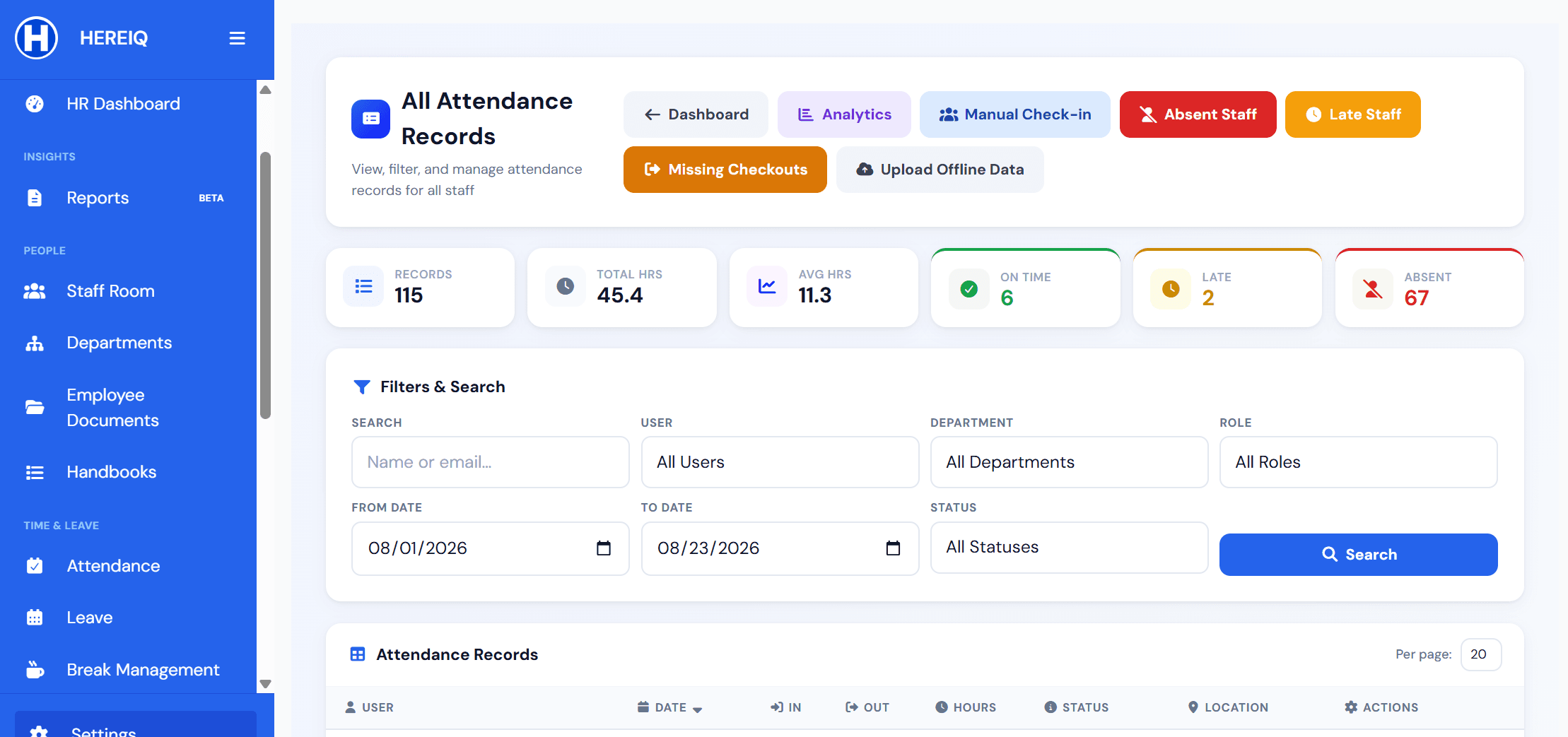
The HereIQ organisation-wide attendance records screen: totals for records, hours and average hours, counts for on time, late and absent, shortcuts to analytics, manual check-in, absent staff, late staff, missing checkouts and offline data upload, and filters for person, department, role, status and date range.
Leave

One queue for every leave request.

Requests, approvals, balances and recalls, with the whole organisation's leave visible on one overview.

  • Pending, approved, denied, recalled and cancelled all live in one filterable list.
  • Organisation-wide policies and per-person balances, set once and applied everywhere.
  • Backdated requests are labelled as backdated, so an approval is never made blind.
The HereIQ leave requests screen: counts for on leave now, pending, approved, denied, recalled, cancelled and ending soon, a staff filter, and status tabs across the whole request queue.
Payroll

Payroll that starts from the attendance you already have.

Payroll that reads the attendance already in the system, and payslips employees can open themselves.

  • Gross, deductions and net per pay period, per person.
  • Generate a run, review it, and export the whole thing to CSV.
  • Payslips as PDF, which employees open from their own portal.
The HereIQ payroll management screen: actions to generate payroll, view all payrolls, staff salaries, analytics and CSV export, alongside totals for paid, pending and rejected runs and a status and month filter.
People

One profile per person. Not one row per spreadsheet.

Employee records, departments and roles — one profile per person, not one row per spreadsheet.

  • Position, department, role and join date on the record itself.
  • Search and filter the whole organisation by name, department or role.
  • Archive someone rather than delete them — the history stays intact.
The HereIQ team management screen: totals for team size, active members, staff and interns, actions to invite, bulk upload or add an offline member, and search by name, department or role.
Documents

Documents filed against the person they belong to.

Contracts, certificates and handbooks — categorised, verified, and tracked to their expiry date.

  • Sorted into categories — health and compliance, payroll and financial — rather than one flat folder.
  • Each document carries a verified status, so you know what has actually been checked.
  • Expiry dates are tracked, so a certificate that lapses is visible before it matters.
  • Employees upload and retrieve their own, and handbooks are published once to everyone.
The HereIQ employee documents screen: one person's file with employment and contracts and HR records sections, each document showing its type, file size, upload date and verification status alongside view, download and expiry actions, and a document activity log beneath.
Hiring & onboarding

From candidate to first shift, without re-typing anything.

Run the pipeline, then bring the hire in once — and they arrive already attached to a department, a role and a schedule.

  • Track candidates by position and status through to hired or rejected.
  • Invite by email, upload a whole team at once, or add a member who works offline.
  • See who has been invited and who is still pending.
  • A new hire lands with a department, a role and a schedule already attached.
The HereIQ candidates screen: a hiring pipeline with an add-candidate action, filters for status and position, and a table of candidates showing position, status and the date added.
Performance

Review cycles the whole organisation runs together.

Track how people are doing over time, against the attendance and history already recorded.

  • Open a named cycle with a start, an end and a self-review window you choose.
  • Goals, check-ins, feedback and reviews in one place instead of four.
  • Watch completion per cycle, and close it when it is done.
The HereIQ performance review screen: a completed quarterly review showing goals carried over from check-ins, attendance drawn automatically from attendance records, and a manager rating across goal achievement, reliability, collaboration and quality of work.
Reports

See the trend, then get the numbers out.

Pull the numbers out — attendance rates, leave, headcount — without rebuilding them by hand.

  • Present against absent, status distribution, and attendance trend over time.
  • Attendance rate for the organisation, or for one department.
  • Attendance, payroll, contracts and leave, each as its own report.
  • Excel, CSV or PDF — whichever the person asking for it actually opens.
The HereIQ attendance analytics screen: totals for on time, absent and late with an attendance rate dial, a present-versus-absent bar chart and a status distribution ring, filtered by date range, department and start and end date.

Built for a real week

The parts a demo skips and a deployment finds.

Networks drop. People pray. Public holidays land mid-payroll. A system that has not thought about those is a system you will be working around by month two.

Offline scan review

Scans taken while the network was down queue up here for review and approval, then upload as normal attendance. Connectivity stops being a reason the day went unrecorded.

The HereIQ offline scan review screen: counts for pending, approved and rejected offline scans, filters across pending, approved, rejected and all, and an empty queue confirming every offline scan has been reviewed.

Breaks, including prayer breaks

Define your own break types, mark them paid or unpaid, and see who is on break right now. Lunch, prayer and other breaks are tracked with a start, an end and a duration.

The HereIQ break history screen: a live indicator of staff currently on break, filters by date, break type and paid status, and a table of breaks showing type, paid status, break in, break out and duration.

A holiday calendar you control

Plan the year on one calendar, or import it from CSV. Holidays are a state attendance understands, not an absence someone has to explain later.

The HereIQ holidays screen: counts of total, upcoming and past holidays for the year, a full twelve-month calendar with holidays marked, and an upcoming holidays panel.

Departments, defined once

Name a department once and pick it from a list every time you invite someone, instead of retyping it and creating three spellings of the same team.

The HereIQ departments screen: a form to add a department with a name and optional description, and a list of existing departments with edit and delete actions.

Handbooks staff have to acknowledge

Publish a policy once and track who has read it. Each handbook is versioned and carries an acknowledgement, so “nobody told me” stops being an argument.

The HereIQ organisation handbooks screen: published documents shown as cards, each with its version, a pending acknowledgement status, and preview and acknowledge actions.

Every employee sees their own record

Staff open their own attendance history — hours, method, status, location — without filing a request. Most disputes end before they reach HR.

The HereIQ employee attendance history screen: totals for records, hours, average per day and this month, a breakdown across present, late, absent, on leave, holiday and rest day, and a from/to filter with last 7 days, last 30 days and last 3 months shortcuts.

Exports in the format they asked for

Attendance, payroll, contracts and leave, for all staff or one person, over any range — as Excel, CSV or PDF.

The HereIQ reports and exports screen: report types for attendance, payroll, contracts and leave, a date-range picker with last 30 days, last 90 days, last year and this year shortcuts, a choice between all staff and an individual, and Excel, CSV and PDF export buttons.

Where the payroll actually went

One period, broken into gross, PAYE tax and social security, with the net payout ratio and the attendance behind it. The number finance is asked to explain, already explained.

The HereIQ payroll analytics screen: totals for payroll, net pay, PAYE tax and social security for the period, a salary components breakdown with a net payout ratio, and an attendance ring showing present, late and absent.

Everything in the box

95 capabilities. One subscription.

Not a starter tier that unlocks the useful parts later. This is what is in the product today — every line below is something you can open and use.

Time & attendance
  • QR check-in at an office location
  • Quick check for a fast clock-in
  • Offline scan when the network is down
  • Personal QR for field and offline work
  • Manual check-in and check-out by HR
  • Office locations, managed centrally
  • Organisation QR code
  • QR scanner for the front desk
  • Present, late, absent, on leave, holiday and rest day
  • Check-in, check-out, hours, method and location per record
  • Missing checkouts listed on their own
  • Upload offline attendance data in bulk
  • Review and approve scans captured offline
  • Absent staff and late staff as their own views
  • Edit an individual attendance record
  • Filter by person, department, role, status or date range
  • Scheduled shifts
  • Employees see their own full history
  • On-time, late and absent counts for the day
Breaks
  • Break in and break out with duration
  • Your own break types, defined by you
  • Lunch, prayer and other breaks out of the box
  • Paid and unpaid breaks tracked separately
  • See who is on break right now
  • Break history filtered by date, type or paid status
  • Breaks logged by the employee or added by HR
Leave & holidays
  • Requests, approvals and denials
  • Recall an approved leave
  • Cancel a request
  • Organisation-wide leave policies
  • Organisation leave balances
  • Personal balance for every employee
  • Annual, emergency, exam and holiday leave types
  • Single dates, ranges, or a set of specific dates
  • Backdated requests flagged as backdated
  • Ending-soon warnings
  • Full-year holiday calendar
  • Import holidays from CSV
  • Year and month calendar views
  • Upcoming, past and this-month holiday counts
Payroll & finance
  • Generate a payroll run
  • Gross, deductions and net per period
  • Staff salaries
  • Payroll policy
  • Payroll analytics
  • Payslips as PDF
  • Employee self-service payslip access
  • CSV export
  • Restore a deleted payroll record
  • Filter by status and month
People & organisation
  • Team directory
  • Departments with names and descriptions
  • Pick a department from a list when inviting
  • Positions and job titles
  • Admin, supervisor and staff roles
  • Invite by email
  • Bulk upload a whole team
  • Offline members for staff without email
  • Pending invitation tracking
  • Deactivate, archive and restore
  • Interns counted separately from staff
  • Search by name, department or role
Documents & compliance
  • Employee documents filed against the person
  • Categories for health, compliance, payroll and financial
  • Employees upload their own
  • Verified status on every document
  • Expiry dates tracked, with a valid-until shown
  • File type, size and upload date recorded
  • View or download in place
  • Handbooks published once to everyone
  • Contracts reportable alongside attendance and payroll
Performance & talent
  • Organisation-wide review cycles
  • Self-review window you set
  • Goals
  • Check-ins and feedback
  • Manager view of the team
  • Review completion per cycle
  • Candidate pipeline with position and status
  • Track a candidate through to hired or rejected
  • Filter candidates by status, position or name
Reporting & administration
  • Present-versus-absent and status distribution charts
  • Attendance trend over time
  • Attendance rate for the organisation or one department
  • Payroll analytics
  • Attendance reports
  • Payroll reports
  • Contract reports
  • Leave reports
  • Excel, CSV and PDF export
  • All staff or one individual
  • Any date range, or the last 7, 30 or 90 days
  • Announcements
  • Notifications
  • More than one organisation on one login
  • In-product help centre

Who it is for

Built in Africa. Ready for the world.

Made where the network drops, the sites are far apart, and the records still have to reconcile. That makes it sturdier everywhere else.

Enterprise organisations

Several departments, several sites, and someone at head office who has to answer for every number — to a board, an auditor, or both.

What answers it: Roles rather than shared logins, one boundary per organisation, an audit trail on every record, and edits that leave a history.

Growing businesses

You passed the headcount where a spreadsheet worked, and nobody wants to own it any more.

What answers it: One record per person, and payroll that reads it directly.

Tech companies

Hours are flexible, half the team is remote, and nobody wants a punch clock — but leave, payroll and reviews still have to be right.

What answers it: Quick check from their own phone, full self-service, and performance cycles in the same system.

More than one site

Staff are spread across offices, sites or routes, and you find out about attendance a week late.

What answers it: Office locations, per-record location, and one organisation view.

NGOs and field teams

Work happens where the network does not, and funders still expect records that reconcile.

What answers it: Offline scan, offline upload, and exports in the format asked for.

Clinics and care

Cover has to be provable, and certificates expire whether or not anyone is watching.

What answers it: Document expiry tracking, verified status, and shift-aware attendance.

Construction and sites

The workplace moves every few months, there is no office to walk into, and the crew changes between phases.

What answers it: Offline scan, location on every record, bulk onboarding, and missing checkouts caught the same day.

Hotels and restaurants

Rotas change daily, service splits the day in two, and staff turn over faster than the paperwork does.

What answers it: Quick check, paid and unpaid breaks, bulk onboarding, and hours that reach payroll on their own.

Shift and retail teams

People clock in and out all day, take breaks at different times, and payroll is hours-based.

What answers it: Quick check, break tracking paid or unpaid, and missing checkouts.

What people say

Real organisations, in their own words.

HR managers and administrators who replaced spreadsheets, WhatsApp groups and paper registers — and said so on the record.

AttendanceGM is a must-have solution for any company that wants to reduce issues around lateness and absences. Instead of constant discussions with staff, the system clearly shows employees what they are being paid and why.

Even for me as a manager, AttendanceGM has helped reinforce our 15-minute grace policy because the system handles everything fairly and transparently.

The customer service has been outstanding. Musa Jawo goes above and beyond to deliver exactly what clients need — genuinely invested in the success of our company, not just his own.

Working with AttendanceGM felt like growing alongside a partner, and that experience is truly priceless.

Legacy Foundation logoUmm LaylaHR Manager · Legacy Foundation, The Gambia

AttendanceGM has made our work much easier and faster. The system is simple to use, reliable, and provides everything an administrator needs in one place.

Managing attendance, tracking staff records, and handling daily HR tasks has become far more efficient since we started using AttendanceGM.

We are glad to be connected with the AttendanceGM team and look forward to continuing our partnership.

Rising Stars Team logoMariama ChattyAdministrator & HR · Rising Stars Team

AttendanceGM is not just an attendance system anymore — it's now a fully HR platform with all the standard HR features we need. Today we use it for attendance tracking, leave management, leave balances, holiday management, and staff document storage. It helped us migrate completely from manual work to digital, and we're continuing to work with the team to build it into the HR platform we've always needed.

WAVE Gambia logoMonique PhillipsHR Manager · WAVE Gambia

These were given when HereIQ was called AttendanceGM. Same platform, same team — the quotes are printed exactly as they were written.

The company

HereIQ is built by CatalystGen.

HereIQ started as AttendanceGM, solving one problem properly: knowing who actually turned up. That turned out to be the hardest part, and everything else — payroll, leave, documents, performance — depends on getting it right.

So the product grew outward from attendance rather than being assembled from separate tools. That is why the modules share one record instead of syncing between themselves, and it is why the name changed: what we built stopped being an attendance app and became an operating system for the workforce.

Same team. Same platform. Same login. New name.

Trust

Payroll and attendance are not places to guess.

Seven controls that are in place today. Nothing below is a badge, a certification, or a promise about next year.

  • End-to-end encryption

    Encrypted on the way in and encrypted where it is stored. Payslips, attendance and employee documents are not sitting in plain text between the device and the disk.

  • Roles, not shared logins

    Admin, supervisor and staff see different things. An employee reaches their own record and no one else's.

  • One organisation, one boundary

    Data belongs to an organisation. A login can hold more than one, and they stay separate.

  • Archive rather than delete

    People are deactivated and archived, not erased. Payroll records can be restored. History survives staff turnover.

  • Audit trail

    Every record says where it came from. Attendance carries its method and location, a break shows whether the employee logged it or HR added it, and backdated leave is labelled backdated.

  • Changes leave a history

    Editing an attendance record does not erase what was there. Deleted payroll records can be restored, and archived people keep the record they built.

  • Backed up daily

    A day is the most you could ever be asked to reconstruct, and payroll runs on records that have to survive a bad afternoon.

What we are not claiming. HereIQ does not currently advertise SOC 2, ISO 27001 or any other third-party certification, because none has been completed. If your procurement process needs a specific attestation, ask us where it stands before you buy rather than after.

What you can check yourself. Uptime for attendance, clock in and out, notifications, leave and payroll is published per service, with 90 days of incident history — outages included. See live status

Pricing

Every module. No modules sold back to you.

Tiers differ by scale and depth, not by locking attendance away from payroll. Published prices, seat minimums included.

This changes the prices you see, not the ones you qualify for. Gambian pricing is for organisations registered in The Gambia paying by a local method, and is confirmed when you pay.

Free

For a small team that just needs attendance to be reliable.

Free

Up to 10 people

  • Attendance tracking
  • Attendance records and history
  • Employee self-service
  • Email support
Start free

Basic

For a team working across shifts, sites, or a bad connection.

$8/user/month

Billed from 15 users — $120/month minimum

  • Everything in Free
  • QR scanner and offline mode
  • Offline data upload
  • Absentee tracking
  • Office locations
Talk to us
Most organisations

Pro

For an organisation running payroll on real hours.

$16/user/month

Billed from 20 users — $320/month minimum

  • Everything in Basic
  • Payroll and payslips
  • Leave and holiday management
  • Advanced analytics and exports
  • Multiple office locations
  • Offline members and notifications
Talk to us

Enterprise

For multiple sites, deeper records, and people who need answers fast.

$24/user/month

Billed from 40 users — $960/month minimum

  • Everything in Pro
  • Advanced reports and auto checkout
  • Break management
  • Performance and goals
  • Staff documents and handbook
  • Onboarding and priority support
Talk to us

Prices are per user, per month, in USD. Every plan starts with a 14-day free trial of the full product — no card, anywhere in the world. Outside The Gambia we set the subscription up with you rather than through a checkout — you pay by card, bank transfer or invoice, and we handle the account. All prices and who qualifies, or ask us for a quote.

Questions

The things people ask before they commit.

Not here? info@attendancegm.com reaches a person.

Does it really work without internet?

Yes, for attendance. An employee can scan offline and the record is held on the device; it uploads and joins the queue when the connection returns, where HR reviews and approves it. HR can also upload offline attendance data in bulk. The rest of the platform needs a connection.

We already use AttendanceGM. Is this a different product?

No. HereIQ is the same product under a new name, from the same team at CatalystGen. Your login, your data and your organisation are unchanged, and the domain has not moved.

Can employees see each other's pay or records?

No. Roles decide what is visible. An employee reaches their own attendance, payslips, leave and documents. Supervisor and admin roles see more, and organisations stay separate from each other even when one login holds several.

How long does it take to get started?

You can create an organisation and start free without a card. Bringing a team in is an email invite, a bulk upload, or adding offline members for staff without email. We would rather quote you a real timeline for your size than a number we made up for a website.

What happens to our data if we leave?

You can export attendance, payroll, contract and leave data as Excel, CSV or PDF at any time, for all staff or one person, over any date range. That is the same export the platform uses day to day, not a special offboarding process.

Do you support more than one location or organisation?

Yes. Office locations are managed centrally and every attendance record carries the location it came from. One login can hold more than one organisation, and they do not share data.

Are you certified — SOC 2, ISO 27001?

Not currently, and we would rather say so than imply otherwise. The controls we do have are described in the trust section above. If procurement needs a specific attestation, ask where it stands before you commit.

Stop reconciling. Start running the whole thing from one place.

Create an organisation, invite your team, and take your first check-in today.

No credit card required · Keeps working when connectivity drops